
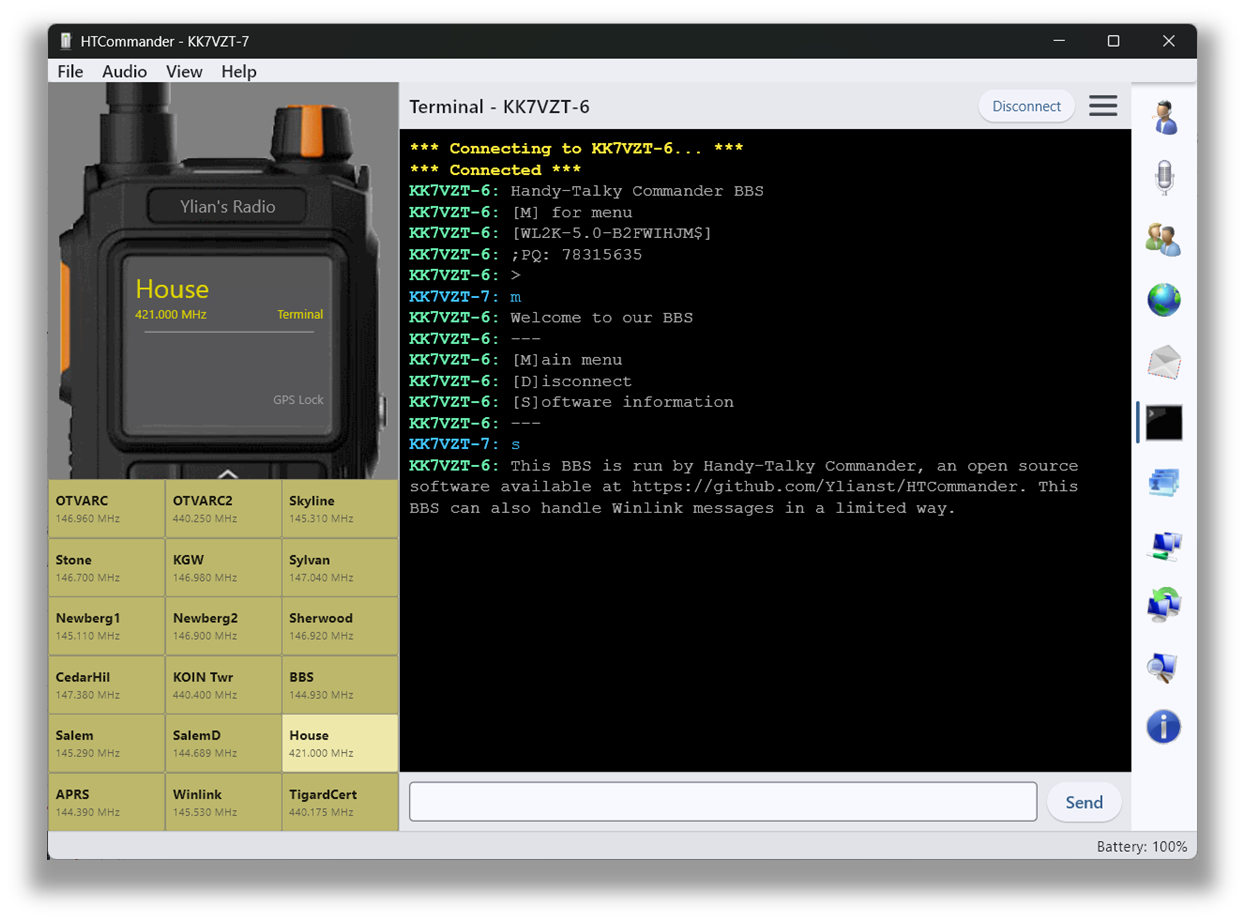
A modem terminal for packet radio
HTCommander includes a built-in terminal that lets you send and receive data directly to another endpoint — great for chatting one-to-one or connecting to a remote BBS. The terminal is only available to operators who hold a license and have allowed the app to transmit; otherwise the option stays hidden.
Getting connected
Open the terminal tab and hit Connect in the upper-right to create a new connection profile or reconnect to an existing one. Specify the remote station, the protocol to use — currently RAW AX.25 frames and APRS frames — and the channel to connect on. Once the profile is created, the radio is automatically set to the right channel and locked there until you disconnect or change the channel on the radio itself.
Smarter than plain KISS
You should not run the terminal on the APRS channel — it's built for use on other channels. The clever part is that while the terminal is connected, the radio can still monitor the APRS channel and display incoming APRS messages, and you can even send APRS messages while the main channel stays locked. Because HTCommander understands which channel is which, it can monitor and transmit on both the APRS and terminal channels without the confusion a plain KISS setup would run into.
Available on all platforms: Windows, macOS, Linux, iOS, Android and web. See also the built-in BBS.