
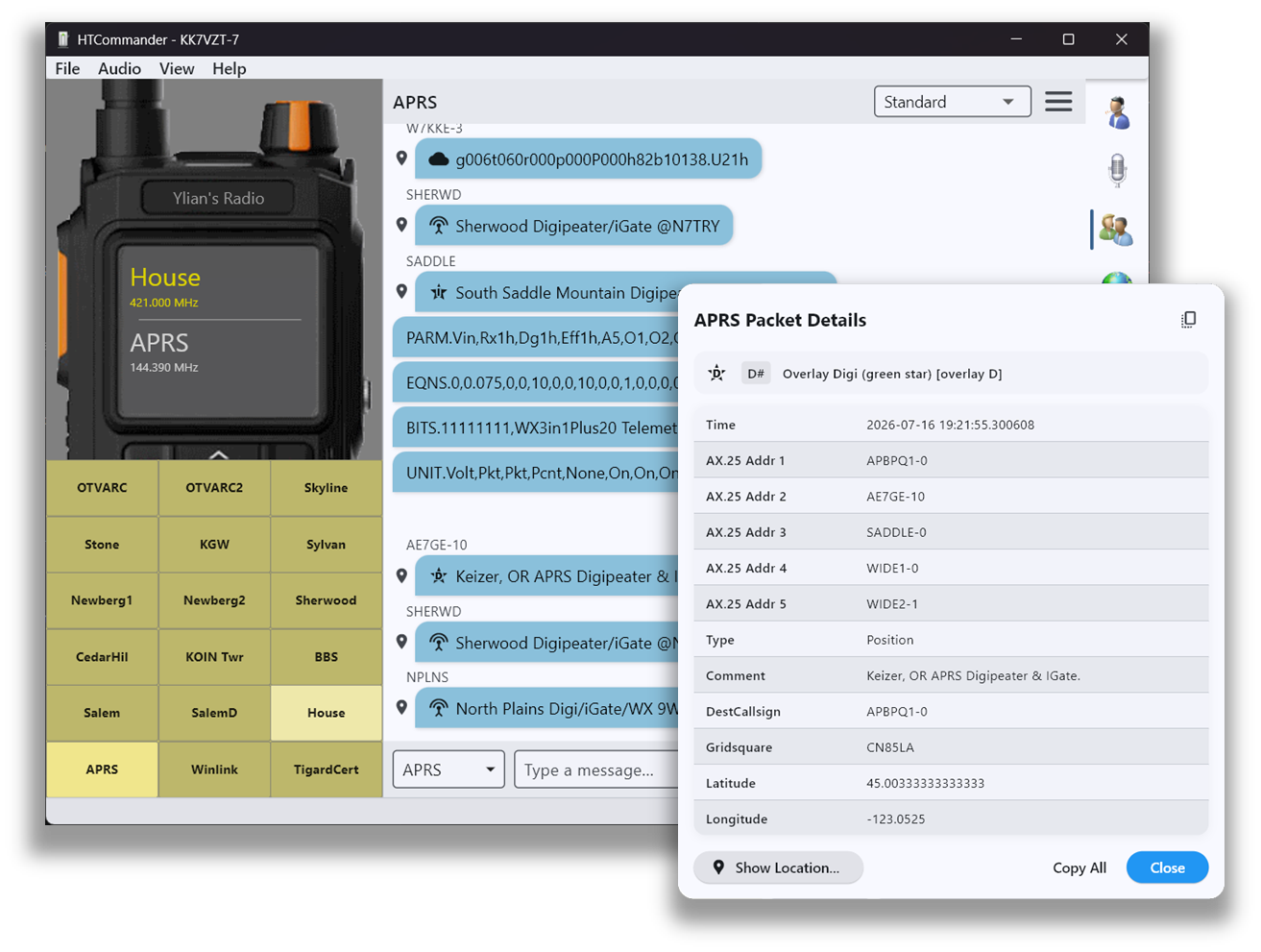
The heart of the app
The APRS tab is the main tab in HTCommander. Use it to read messages from other stations, send your own, and watch a steady stream of telemetry. If your radio is set up correctly it monitors the APRS channel continuously — even while you're listening to voice on a different channel — so don't be surprised to see APRS traffic arrive while you're parked on your favorite repeater.
When you send an APRS message, HTCommander tells the radio the packet is APRS so it is transmitted on the correct frequency. To make this work, a channel named APRS must exist. If you don't have one yet, HTCommander pops up a dialog to help you create it.
Click the menu in the upper-right to hide telemetry messages if you only want to see conversations. Every APRS packet is clickable: open a full decode of the AX.25 path, position, grid square and comment, or right-click a station that sent coordinates to see it on a mini-map.
Custom routes
In File → Settings → APRS you can add extra APRS routes. Once more than one route is configured, a drop-down appears in the upper-right of the APRS tab so you can choose which route to use when sending. That lets your messages hit the right digipeaters to reach their destination.
Text ordinary phones over SMS
With a callsign configured and transmit enabled, you can send SMS text messages to ordinary mobile phones over APRS — perfect when you need to reach someone and have no cell coverage. The recipient must opt in first: they visit aprs.wiki, and confirm with an SMS reply.
Once they've opted in, open the menu in the upper-right of the APRS tab, choose SMS Message…, then enter the phone number and message. Note that both the number and message travel unencrypted and unauthenticated.
Weather reports on demand
With a callsign and transmit enabled you can also request a weather report for a location and time. From the upper-right menu choose Weather Report…, enter the location and pick a time and report type. This uses the WxBot service.
Authenticated messages
HTCommander can send authenticated APRS messages. Two or more stations share a password entered in the HTCommander address book. When you message that station, a 6-digit authentication code is appended. If the receiver has the same password, it verifies the message and displays it in green; a mismatch shows in light orange.
The password is never sent over the air — it only generates the code, which is derived from the message, the password and the current time. Because the code changes every minute, replayed messages fail the check, so keep the stations' clocks in sync. Encryption isn't permitted in amateur radio, but authentication is — this feature provides authentication only. If you rely on it, use a long, strong password, since someone capturing many messages could try to brute-force a weak one.
Implementing this in your own software? The authentication specification is published on GitHub.
Available on all platforms: Windows, macOS, Linux, iOS, Android and web. Related: the live APRS map and the shared address book.